Archives 2026

Auphonic's Automatic Cutting now works with video files. You can automatically remove silence, filler words, coughs, and music segments directly from video podcasts, interviews, webinars, lectures, and broadcast recordings – without a separate video editor. You can also use the Auphonic Editor to manually cut your video, just like in a traditional video editor.

1080p video cutting is included in the free plan. 4K video cutting is available on all paid plans. Video cutting works in the web interface, the Auphonic API, and the Auphonic CLI.

Auphonic automatic video cutting: remove silence, filler words, coughs, and music from video files

What You Can Cut from Videos

Auphonic offers four automatic cutting ...

Auphonic is now available from the command line:
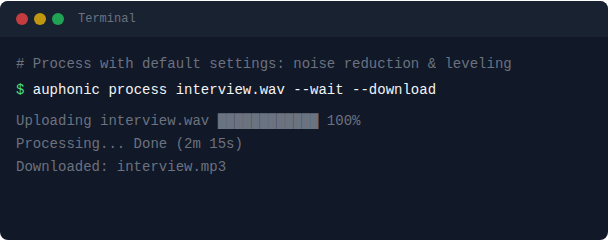
The Auphonic CLI lets you process, manage, and automate audio productions without leaving the terminal. It's a free, single binary with no dependencies — just download it, authenticate, and start processing.

Auphonic CLI Terminal

Everything you know from Auphonic is available: Noise Reduction, Loudness Normalization, Speech Recognition, Multitrack Processing, Presets, and publishing to External Services. All from a single command.

Use Cases

Whether you're producing a single episode or processing thousands of files, the CLI fits into a wide range of workflows:

File-based workflows: If you're a broadcaster, podcaster, ...

We built Auphonic to remove friction from podcast production.

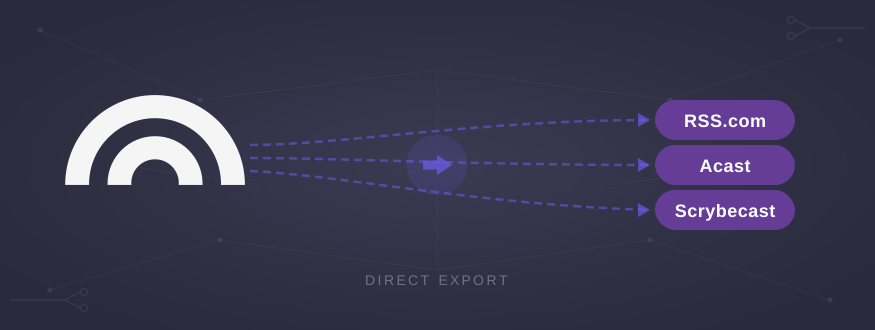
In our view, you should be able to focus on your content, while the technical work happens reliably in the background. And when you're happy with your results, you can export your production directly to your hosting platform. And if your hosting platform isn't on the list yet — you can build your own integration using our API.

Auphonic Direct Export to RSS.com, Acast, Scrybecast

That philosophy shapes everything we build - from Loudness Normalization, to Noise Reduction, to Production Presets.

External Publishing builds on this idea: delivering your episode to your hosting ...

We’ve expanded our Automatic Cutting feature to make it even more useful for broadcast and long-form productions. You can now remove entire music segments with Auphonic. For example, songs in radio shows, podcasts, or recorded broadcasts, which must be removed due to licensing restrictions.

Auphonic cuts music segments from productions automatically

In many broadcasting workflows, this is not just a convenience but a requirement: music may be included in live transmissions, but archived or on-demand versions are often not permitted to make that music permanently available. Automatic music removal ensures compliance while keeping spoken content intact.

Designed for Longer Music Segments

The new Cut Music option is ...

Audiobook production has a uniquely stressful property: technical delivery specs are strict, and a single out-of-range file can delay an entire release. Audible / ACX is a common example with strict criteria that uploaded files need to fulfil before they're accepted.

That’s why we’ve added an additional loudness normalization method in Auphonic: RMS-based normalization. It’s designed specifically for workflows that need RMS targets, including Audible / ACX.

RMS Normalization for Audible / ACX in Auphonic

What ACX requires (loudness and peaks)

ACX asks for each file to meet a level measured in RMS and a maximum peak limit. The headline values as stated in their ...

Monthly archives

Previous year

2025